En frisk och fräsch mun är en förutsättning för att kunna leva ett fullgott liv. Du behöver dina tänder för att äta, skratta och prata. Därför är det viktigt att gå till tandläkaren regelbundet. Om problem i munnen upptäcks och åtgärdas i ett tidigt skede kommer du att ha större förutsättningar för att få behålla dina tänder livet ut och dessutom spara både tid och pengar.

Plötsligt så händer det och ibland är det inte lätt att veta vart man skall vända sig. Om du får du akuta besvär, hör av dig till oss så tidigt som möjligt på dagen. Då är chansen större att vi har möjlighet hjälpa dig snabbt.
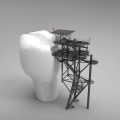
Din tand behöver lagas om du har fått hål i den eller om en gammal lagning har gått sönder. Det finns några olika sätt att laga en tand, men det vanligaste är att den lagas med en kompositfyllning.

Att gå till tandläkaren regelbundet för att få sina tänder undersökta är viktigt. Då kan tandsjukdomar och andra problem i munnen oftast upptäckas i ett tidigt skede. Ju tidigare man upptäcker ett problem desto lättare är det att behandla.

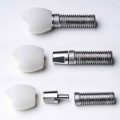
Saknar du en eller flera tänder kan lösningen vara ett tandimplantat. En eller flera titanskruvar opereras då in i käkbenet som man sedan kan fästa en krona bro eller protes på.

Alla vill vi ha friska tänder och en fräsch mun. Vi vill slippa karies och andra tandsjukdomar och få behålla våra egna tänder livet ut. Det är just inom detta område som våra tandhygienister har en unik kompetens.
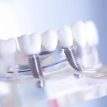
Kronor och broar görs för att ersätta en eller flera skadade tänder. En krona ersätter en tand och en bro ersätter flera tänder. Dessa ser ut och fungerar som vanliga tänder.
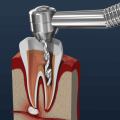
En rotfyllning behöver göras när pulpan som är tandens innersta vävnad blivit inflammerad eller infekterad. Om pulpan är inflammerad är detta ofta förenat med tandvärk. Vanliga orsaker är att man fått ett stort hål i en tand eller att bakterier läckt in i pulpan via en djup fyllning.
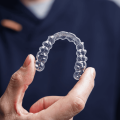
Tandreglering är när man ändrar på tänders läge av någon anledning. Det kan bero på många saker, exempelvis om tänderna vuxit snett, kommit fram på fel ställe eller om de sitter alldeles för tätt. En annan orsak är om man har problem med att bita av och tugga på grund av över- eller underbett.

Om du vill bleka dina tänder, är det viktigt att du gör det under överinseende av en tandläkare eller tandhygienist. Då vet du att metoden är säker och du kan känna dig trygg. Vill du veta mer innan du bestämmer dig är du välkommen att kontakta oss.

Om du önskar boka, omboka eller avboka en tid sker detta via telefon.
Om du är över 18 år och fått en kod via post eller SMS kan du även omboka din
tid på webben. Gäller ej avbokning, boka en helt ny tid eller om du är under 18 år då sker detta via telefon.
Övriga frågor tar vi gärna emot via e-post eller telefon. Kontakta oss via mejladress receptionen@tandvardenhabo.se
Eller slå oss en signal
Tandvård tandläkare Jönköping, Habo, Mullsjö, Bankeryd Accessibility Statement
We firmly believe that the internet should be available and accessible to anyone, and are committed to providing a website that is accessible to the widest possible audience, regardless of circumstance and ability.
To fulfill this, we aim to adhere as strictly as possible to the World Wide Web Consortium’s (W3C) Web Content Accessibility Guidelines 2.1 (WCAG 2.1) at the AA level. These guidelines explain how to make web content accessible to people with a wide array of disabilities. Complying with those guidelines helps us ensure that the website is accessible to all people: blind people, people with motor impairments, visual impairment, cognitive disabilities, and more.
This website utilizes various technologies that are meant to make it as accessible as possible at all times. We utilize an accessibility interface that allows persons with specific disabilities to adjust the website’s UI (user interface) and design it to their personal needs.
Additionally, the website utilizes an AI-based application that runs in the background and optimizes its accessibility level constantly. This application remediates the website’s HTML, adapts Its functionality and behavior for screen-readers used by the blind users, and for keyboard functions used by individuals with motor impairments.
If you’ve found a malfunction or have ideas for improvement, we’ll be happy to hear from you. You can reach out to the website’s operators by using the following email
Our website implements the ARIA attributes (Accessible Rich Internet Applications) technique, alongside various different behavioral changes, to ensure blind users visiting with screen-readers are able to read, comprehend, and enjoy the website’s functions. As soon as a user with a screen-reader enters your site, they immediately receive a prompt to enter the Screen-Reader Profile so they can browse and operate your site effectively. Here’s how our website covers some of the most important screen-reader requirements, alongside console screenshots of code examples:
Screen-reader optimization: we run a background process that learns the website’s components from top to bottom, to ensure ongoing compliance even when updating the website. In this process, we provide screen-readers with meaningful data using the ARIA set of attributes. For example, we provide accurate form labels; descriptions for actionable icons (social media icons, search icons, cart icons, etc.); validation guidance for form inputs; element roles such as buttons, menus, modal dialogues (popups), and others. Additionally, the background process scans all of the website’s images and provides an accurate and meaningful image-object-recognition-based description as an ALT (alternate text) tag for images that are not described. It will also extract texts that are embedded within the image, using an OCR (optical character recognition) technology. To turn on screen-reader adjustments at any time, users need only to press the Alt+1 keyboard combination. Screen-reader users also get automatic announcements to turn the Screen-reader mode on as soon as they enter the website.
These adjustments are compatible with all popular screen readers, including JAWS and NVDA.
Keyboard navigation optimization: The background process also adjusts the website’s HTML, and adds various behaviors using JavaScript code to make the website operable by the keyboard. This includes the ability to navigate the website using the Tab and Shift+Tab keys, operate dropdowns with the arrow keys, close them with Esc, trigger buttons and links using the Enter key, navigate between radio and checkbox elements using the arrow keys, and fill them in with the Spacebar or Enter key.Additionally, keyboard users will find quick-navigation and content-skip menus, available at any time by clicking Alt+1, or as the first elements of the site while navigating with the keyboard. The background process also handles triggered popups by moving the keyboard focus towards them as soon as they appear, and not allow the focus drift outside of it.
Users can also use shortcuts such as “M” (menus), “H” (headings), “F” (forms), “B” (buttons), and “G” (graphics) to jump to specific elements.
We aim to support the widest array of browsers and assistive technologies as possible, so our users can choose the best fitting tools for them, with as few limitations as possible. Therefore, we have worked very hard to be able to support all major systems that comprise over 95% of the user market share including Google Chrome, Mozilla Firefox, Apple Safari, Opera and Microsoft Edge, JAWS and NVDA (screen readers), both for Windows and for MAC users.
Despite our very best efforts to allow anybody to adjust the website to their needs, there may still be pages or sections that are not fully accessible, are in the process of becoming accessible, or are lacking an adequate technological solution to make them accessible. Still, we are continually improving our accessibility, adding, updating and improving its options and features, and developing and adopting new technologies. All this is meant to reach the optimal level of accessibility, following technological advancements. For any assistance, please reach out to